Building 48 tools for Australian small businesses
How I turned the spreadsheets small businesses kept needing into ready-made Excel, Power BI and Windows tools, and what I learned along the way.
Most small businesses in Australia don't run on expensive software. They run on a spreadsheet someone set up years ago, a folder of receipts, and an owner doing the books at night.
As a freelance data analyst in Brisbane, I kept seeing the same few problems. BAS figures pulled together the night before they're due. Rosters published before anyone knows the wage bill. Quotes priced by guesswork. The fixes were rarely complicated, but they weren't available in a form that fits how Australian businesses actually work.
So this year I built them. The result is a shop of 48 tools and 12 bundles, from a $9 shift pay checker to Power BI dashboards, all set up for GST and the July–June financial year. I hope to make more and have interests to see where I can grow myself.
Why most templates fall short
Most templates you find online assume a calendar year and US tax. Many also start blank, so you fill in 50 rows before you find out whether the thing is any use.
An Australian small business needs something different:
- Figures that match the BAS: G1, 1A and 1B for each quarter.
- A July–June year, so the totals line up at tax time.
- Award pay rates, weekend and public holiday penalties, and super. Under Payday Super, super now has to reach each employee's fund within 7 business days of payday.
- ATO rules built in: what a tax invoice has to show, how the 12-week vehicle logbook works, and the 91c per km rate for 2026–27.
The owner also has very little time. They don't want more features. They want to type in one place and see one answer.
What I built
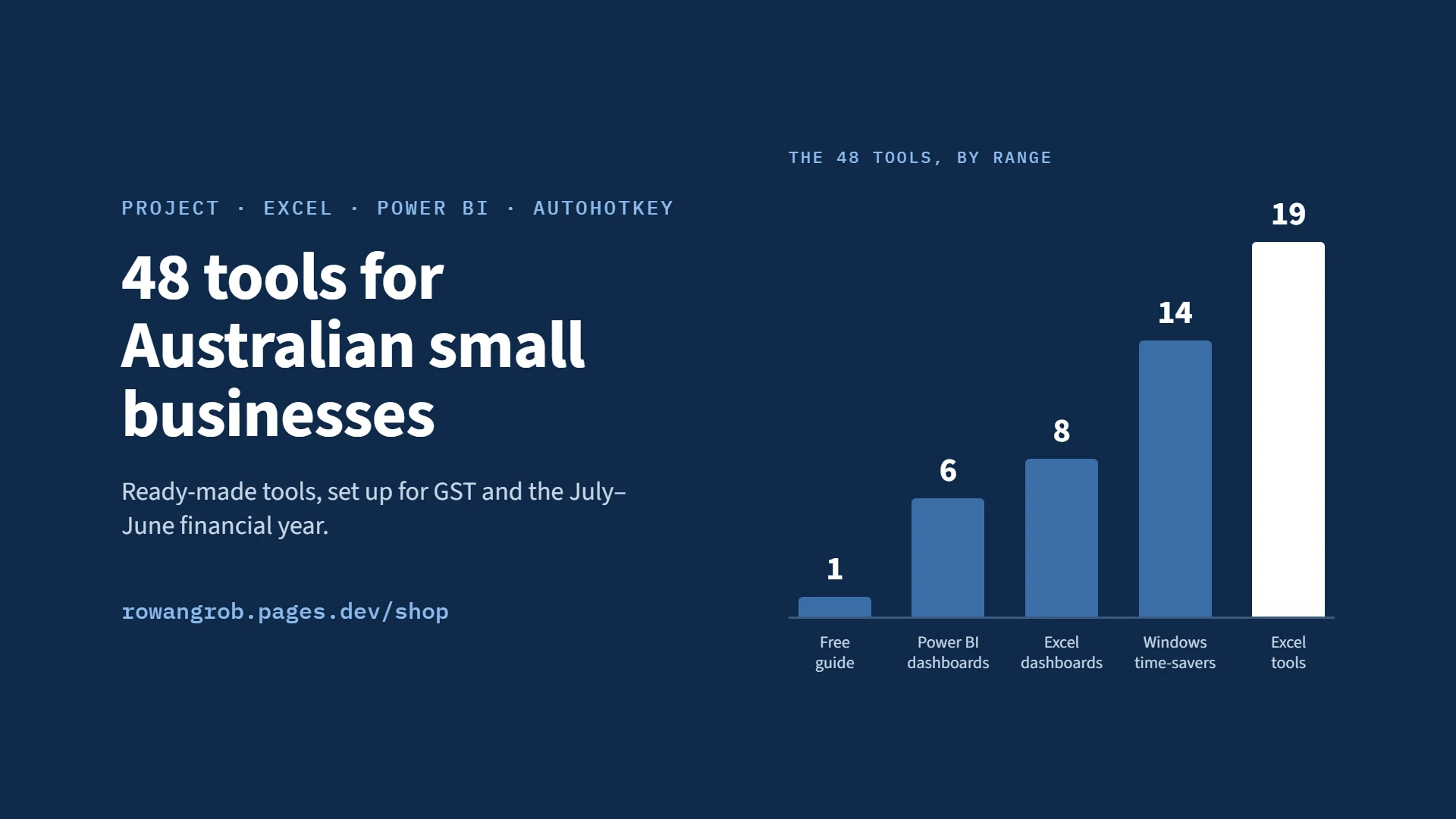
The shop has 48 tools across five ranges and a free guide, plus 12 bundles that group them by type of business. They're written for sole traders, tradies, cafés and shops, salons, studios, short-stay hosts, tutors, sports clubs, freelancers and office staff.
- Money and tax (Excel): 10 tools, $12–$19. Includes the Sole Trader GST & BAS Tracker, Invoice Maker and Vehicle Logbook.
- Staff, jobs and customers (Excel): 9 tools, $9–$19. Includes the Roster & Wage Cost Planner, Job Costing Tracker and Club Membership Tracker.
- Excel dashboards: 8 dashboards, $25–$29. Includes Café & Retail Takings, Quotes & Jobs and Short-Stay Host.
- Power BI dashboards: 6 dashboards, $29–$35. Includes Small Business Starter, Online Shop Sales and Salon & Beauty.
- Windows time-savers (AutoHotkey): 14 tools, from pay what you want to $12. Includes the Office Time-Saver, Tradie Office Pack and Workspace Saver.
- Free guide: Key Dates 2026–27, with every ATO and pay date and calendar files.
- Bundles: 12 bundles, $39–$79. Includes Sole Trader Admin, Trades and Employer.
How I built it
Every tool follows the same five rules:
- Type in one place, read one answer. No hunting across tabs to find the number you need.
- A plain-English "Start here" sheet. It answers the questions that would otherwise become support emails.
- Demo data from a made-up business. You see how it works before you type anything. The dashboards come with two years of it, so this-year-versus-last-year comparisons work straight away.
- Australian by default. GST, the July–June year, award rates and ATO rules, with financial-year lists running to at least FY2035.
- No coding, no internet connection. The Windows tools are set up in plain-text files and run entirely on the user's PC.
The parts, and why I chose each:
- Excel for the tools, because it's what small businesses already have open.
- Power BI templates for the dashboards, reading one Excel file with Power Query and DAX. Power BI Desktop is free, and the buyer only points it at their file.
- AutoHotkey v2 for the Windows time-savers, with plain-text settings so anyone can change a message without code.
- HTML, CSS and JavaScript on Cloudflare Pages for the shop website. Hosting is free, and one settings file switches each product from "Coming soon" to "Buy".
- Gumroad for checkout. It takes payment, delivers the download and handles GST and overseas taxes.
- PDF and calendar (.ics) files for the Key Dates guide, so every date drops into Outlook, Google or a phone with a reminder a week ahead.
Checking the rules. Every rate and rule is checked against its source: the ATO for BAS, tax invoices, logbooks and cents per km, and Fair Work for award rates and leave. A yearly checklist lists every cell that holds a rate, so each tool can be updated after 1 July.
Testing. Each Power BI dashboard is checked against its Excel version, using the same demo data and the same totals. Every Windows pack went through a written test on a real PC, shortcut by shortcut, including what happens when a settings file has a typo in it.
Getting it to market
I release the tools in weekly waves instead of all at once. A new group goes live each Monday from 27 September to 9 November 2026, which gives me something new to share every week. The bundles come last, once every tool in them is live.
The order follows the Australian business calendar, because that's when people go looking for help:
- October: the July–September BAS is due 28 October. The GST & BAS Tracker, Vehicle Logbook and free Key Dates guide come first.
- November–December: Christmas rosters and public holiday rates. The Roster & Wage Cost Planner and Café & Retail Takings dashboard.
- January: a quiet month to get organised. Budget vs Actual and the Cash Flow Forecast.
- February–March: school terms and winter sport registrations. The Tutor & Lesson Tracker and Club Membership Tracker.
- June: the end of the financial year, and the biggest month. All the bundles, and Budget vs Actual for the new year.
- July: new rates and dates. The yearly update of every tool and a new Key Dates edition.
The free Key Dates guide is the front door. It has every ATO and pay date from October 2026 to November 2027, and people who opt in hear about new tools. On LinkedIn, I post tips that are useful on their own, like the three BAS numbers or logbook versus cents per km, and mention one tool at the end.
Australian Consumer Law shaped the shop too. There are no made-up "was $29, now $19" prices. Bundle savings on the website are worked out from today's separate prices, so they stay true when a price changes. I ask every buyer for an honest review and never reward good ones.
What I learned
- Local detail is the product. "Set up for GST and July to June" matters more than any feature. Most templates online assume a calendar year and US tax.
- Show, don't explain. A screenshot of a dashboard full of demo data does more than a paragraph of description.
- The writing is half the build. The Start here sheets, setup guides and descriptions took as long as the formulas. They decide whether someone succeeds without emailing me.
- Rates go stale every 1 July. Planning the yearly update from day one is what keeps buyers trusting the numbers.
- Test on the real thing. One shortcut worked after a space but not straight after a word, like "Thanks;date". Only testing on a real PC found it.
- Making it is half the job. Getting it in front of the right people at the right time of year is the other half.
None of this is different from client work. Understand how the business really runs, model the data, test with real use, then write it up so nobody needs to call you. The shop packages that so a business can do it themselves.
Have a look
If you run a small business, the tools are in my shop, from $9. The Key Dates 2026–27 guide is free.
If you'd rather have something built for your own business, that's what I do day to day. See my services or message me for a free 20-minute chat.